
Venabox Hub - Ani Planet

Venabox Hub App for Android

Venabox Hub is a lightweight journey diary and planning app where users can capture photo memories, create diary entries, and prepare routes, attractions, dates, and notes for upcoming trips. It brings a simple mobile-first interface together with visual memory cards, cover photos, city details, and written travel notes.

  • No credit card required
  • Free tools app on Google Play
  • Updated with bug fixes in April 2026
Venabox Hub journey diary home screen
5L+ Play Store downloads
1.2.9 Latest indexed version
45.7 MB Approx APK size
3+ Content rating

App Preview

See Venabox Hub in action

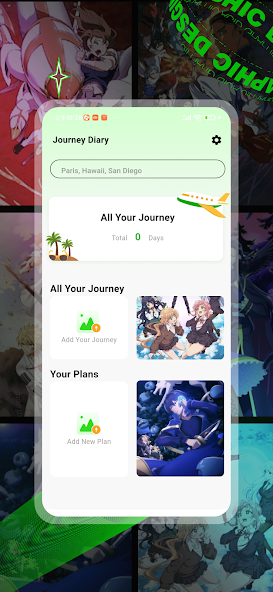
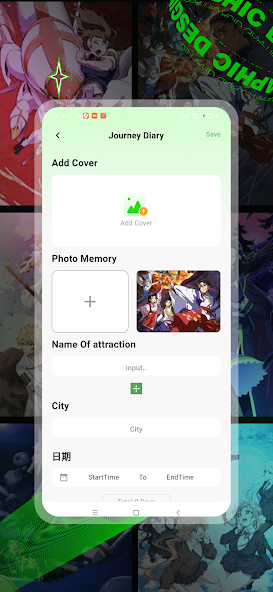
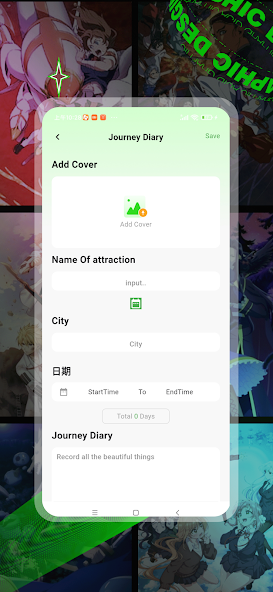
Original visual assets from the public Google Play listing show the journey diary dashboard, add-memory flow, and trip entry form.
Venabox Hub all your journey screen Venabox Hub add cover and photo memory screen Venabox Hub journey diary entry form

What is Venabox Hub?

Venabox Hub - Ani Planet is an Android tools app developed by white6657. The app listing describes it as a companion for travel enthusiasts who want to record memorable moments and plan future journeys. The app combines memory capture, diary creation, and journey planning into one mobile experience.

Instead of separating travel photos, handwritten notes, locations, and trip ideas across different apps, Venabox Hub keeps the core journey details in one place. The home screen presents all journeys and plans in a straightforward layout, while the entry screen gives users fields for cover images, photo memories, attraction names, city names, start and end dates, total days, and diary text.

This makes it useful for people who want a compact personal travel log without a complex setup process. You can organize places, attractions, notes, dates, and photo memories so a trip feels easier to remember and easier to plan. The current app identity uses the name Ani Planet, and the original listing visuals include anime-styled artwork behind the journey diary interface. That gives the app a more playful look than a traditional travel notebook while still presenting practical tools for saving and organizing trip memories.

  1. Capture beautiful memories with photos.
  2. Create diary entries for important travel moments.
  3. Explore diary-style content inside the app experience.
  4. Plan places, dates, attractions, and travel notes.
  5. Keep journey details organized in a simple interface.

Download Venabox Hub for PC, Laptop, and Mac

Venabox Hub is listed as an Android app. If you want to run it on a Windows laptop, PC, or Mac, the practical method is to use a trusted Android emulator and then install the app through Google Play inside that emulator.

Using the app on a larger screen can be helpful when you are writing longer diary entries, reviewing trip notes, or organizing photo memories before a journey. A desktop setup also gives you more room to type attraction details and city names. The app itself remains Android-focused, so performance, storage access, and sign-in behavior will depend on the emulator you choose and the configuration of your computer.

For the best experience, keep your emulator updated, sign in with your Google account, and install apps only from official sources where possible. Avoid unknown APK mirrors unless you are only researching app metadata, because official stores provide clearer update and safety information.

PC setup guide

  1. Install a reputable Android emulator.
  2. Open Google Play inside the emulator.
  3. Search for "Venabox Hub - Ani Planet".
  4. Install and launch the app.
  5. Use the larger screen for diary and planning tasks.

Key Features

Everything highlighted on the app listing

Venabox Hub focuses on the everyday travel workflow: save the moment, describe it, organize the plan, and return to it later.
01

Journey Diary

Build diary entries around places, dates, photos, and written notes. Each trip can become a small story instead of a loose collection of images.

02

Photo Memories

Capture and attach photos so your trips have a visual timeline. Cover images and memory photos make it easier to identify a journey quickly.

03

Travel Planning

Prepare attractions, city details, trip dates, and planning notes before you go. The form-based flow keeps important details easy to enter.

04

Simple Interface

The app preview shows a clean mobile UI focused on quick entry and easy browsing. Big cards, simple buttons, and clear fields help reduce clutter.

Why Choose

Why choose Venabox Hub - Ani Planet?

Venabox Hub is designed for users who want a direct, visual, and easy way to keep travel memories and plans together.

All-in-one travel memory space

Many people save photos in a gallery, notes in a notes app, and plans in a calendar. Venabox Hub brings the main travel elements into one Android experience, so your journey details feel connected instead of scattered across different places.

Visual design with personality

The app uses a bright mobile interface and anime-inspired background visuals, giving it a distinctive look. For users who prefer apps that feel less plain and more expressive, this gives the journey diary a stronger personality.

Simple enough for quick entries

The screens focus on practical fields: cover, photo memory, attraction name, city, date, and diary text. That makes it suitable for quick updates during a trip, not only long writing sessions after the trip ends.

Free access from Play Store

The app is publicly listed as free to download. Users can check the official Google Play page for the latest availability, device compatibility, version details, and safety declarations before installing.

User Feedback

What users are saying

Public review signals show strong interest in the app, while some users also mention bugs, ads, or changes in app behavior. A balanced website should show both the positive reception and the practical notes users care about.
★★★★★

Good visual quality

Some users praise the app experience for quality, smooth browsing, and having a lot to explore in one place. This feedback suggests that users value Venabox when it feels fast, simple, and easy to use.

★★★★★

Helpful on daily use

Positive reviews often mention that the app works well after installation and becomes part of the user's routine. For a diary and planning tool, repeated use matters because memories are best saved consistently.

★★★☆☆

Ads and loading notes

Some public comments mention ads, retry screens, or loading issues. These are useful signals for users to consider before downloading and for the app team to improve in future bug-fix releases.

Latest Update

Venabox Hub version information

The details below summarize the current public listing and indexed app data that users commonly look for before downloading.
App Name Venabox Hub - Ani Planet
Package ID com.dubani.dub
Developer white6657
Category Tools
Updated On 10 Apr 2026
What's New Bug Fix

Data safety details

The Google Play listing states that no data is shared with third parties and no data is collected. It also indicates that data is not encrypted and data deletion is not available.

Before installing any Android app, users should review the Play Store data safety panel, permissions, developer contact details, and recent reviews. These details help users decide whether the app matches their privacy expectations and device needs.

No data shared with third parties No data collected Data is not encrypted Data cannot be deleted

Questions

Venabox Hub FAQ

Is Venabox Hub free?

The public listings show Venabox Hub as free to download. Availability can still vary by region, device type, and Play Store account settings, so the official listing is the best place to confirm the latest status.

Where should I download it?

Use the official Google Play listing whenever possible. Third-party APK sites can be useful for research, but they are not the preferred install source.

What Android version is required?

Third-party indexes list Android 6.0+ as the minimum requirement. Always confirm requirements on your device's Play Store page because compatibility can change after updates.

What does the app do?

The current listing describes journey diary, photo memory capture, and trip planning features. The app preview shows screens for all journeys, adding a journey, adding cover images, saving photo memories, entering city names, choosing dates, and writing diary notes.

Can I use Venabox Hub on PC?

There is no separate Windows or Mac version shown in the Play listing. Users who want a PC experience can try an Android emulator, then install the app from Google Play inside the emulator.